What you can do with plaintext formats
Categories:
Introduction to the Plain Text World
Digital content is created today in a wide variety of forms: websites, documentation, presentations, or technical diagrams. Traditionally, such content is often created with graphical tools—such as Word, PowerPoint, or drawing programs. These tools are intuitive but have a crucial disadvantage: the content is usually stored in proprietary file formats and is difficult to automate, version, or process further.
An alternative to this is plain text formats. Here, content is not described visually but via a simple, text-based syntax. These files can be edited with any text editor, easily versioned, and automatically processed further.
Especially in software development, DevOps environments, and modern documentation processes, an approach has therefore become established that is often referred to as “Documentation as Code”: content is treated like source code—written in plain text, versioned in Git, and automatically published.
What Exactly Are Plain Text Formats?
Plain text formats are file formats whose content consists of normally readable text. They do not require special software to be read but can be opened with any simple editor.
Typical characteristics of plain text formats include:
- Human readability – even without special software
- Simple structure through lightweight markup syntax
- Version control with systems like Git
- Automatability through build pipelines
- Portability across different systems
An example is a simple Markdown file:
# Title

This is a paragraph.

- Point 1
- Point 2

The text remains readable even when it has not yet been rendered.
This property fundamentally distinguishes plain text formats from formats like .docx, .pptx, or .vsdx, which contain complex XML structures internally and can only be meaningfully edited with special software.
What Formats Are Available?
Plain text formats can be roughly divided into two categories:
- Formats for structuring text
- Formats for describing visualizations
Both follow the same principle: content is described via a simple syntax and then automatically rendered.
Formats for Text Processing
Markdown
Markdown is probably the most widely used plain text format. It was developed to structure text as simply as possible without compromising readability.
Typical use cases include:
- README files
- technical documentation
- websites
- knowledge bases
Markdown uses a very simple syntax:
# Heading

## Subheading

**Bold**
*italic*

- List item
- List item
The strength of Markdown lies in its simplicity and broad support. Platforms like GitHub, GitLab, or many CMS systems support Markdown directly.
The downside: functionality is deliberately limited. More complex document structures are more difficult to implement with it.
AsciiDoc
AsciiDoc is a significantly more powerful text format than Markdown. It is aimed primarily at technical documentation and extensive content.
Compared to Markdown, AsciiDoc offers, among other things:
- complex document structures
- tables of contents
- references
- tables
- variables and attributes
- expandable functions
Example:
= Document Title
Author
:toc:

== Chapter

A paragraph.

=== Subchapter

* List item
* List item
AsciiDoc is particularly suitable for:
- extensive technical documentation
- manuals
- books
- architecture documentation
Especially in combination with tools like Antora or Asciidoctor, very professional documentation portals can be generated from it.
Other Well-Known Formats
In addition to Markdown and AsciiDoc, there are other text-based markup languages:
reStructuredText (reST)
Frequently used in the Python ecosystem, for example for documentation with Sphinx.
Org Mode
A very powerful format from the Emacs environment that combines notes, task management, and documentation.
LaTeX
A scientifically oriented typesetting system, particularly used for mathematical content and scientific publications.
Textile
An older markup format that was previously used in many wikis.
Formats for Visualization
In addition to text, diagrams and visualizations can also be described in plain text.
Here, diagrams are not drawn but their structure is described textually.
Mermaid
Mermaid is a widely used language for creating diagrams in plain text. It is now directly supported by many platforms, including GitHub, GitLab, and numerous documentation systems.
A simple example:
graph TD
A[Start] --> B{Decision}
B -->|Yes| C[Action]
B -->|No| D[End]
This results in:
graph TD
A[Start] --> B{Decision}
B -->|Yes| C[Action]
B -->|No| D[End]
Mermaid supports, among other things:
- Flowcharts
- Sequence diagrams
- Gantt charts
- State diagrams
- ER diagrams
The great advantage of Mermaid is the simple syntax and broad integration into modern documentation platforms.
PlantUML
PlantUML is a powerful language for describing UML diagrams and many other diagram types.
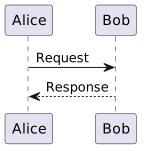
Example of a sequence diagram:
@startuml
Alice -> Bob: Request
Bob --> Alice: Response
@enduml
The result:
PlantUML supports:
- UML diagrams
- Sequence diagrams
- Component diagrams
- Deployment diagrams
- C4 models
- Architecture diagrams
PlantUML is particularly popular in the architecture and software design context.
Other Well-Known Formats
In addition to Mermaid and PlantUML, there are other text-based visualization languages:
Graphviz / DOT
One of the oldest diagram description languages for graphs.
D2
A modern diagram language with a focus on simple readability.
Structurizr DSL
A language specifically for describing architecture diagrams according to the C4 model.
TikZ
A very powerful diagram language from the LaTeX world.
Application Possibilities
Plain text formats are extremely versatile and can be used in many areas.
Notes
Many modern note-taking systems are based on Markdown or similar formats. Examples include knowledge systems, personal wikis, or structured notes.
The advantage: notes remain readable in the long term and independent of specific software.
Websites
Many modern websites are generated from plain text formats. Static site generators automatically convert Markdown or AsciiDoc files into HTML pages.
Well-known tools include:
- Hugo
- Jekyll
- MkDocs
- Antora
This principle is frequently used for documentation websites and blogs.
Documents
Classic documents can also be generated from plain text:
- Word
- HTML
- Presentations
Tools like Pandoc enable conversion between numerous formats.
Documentation
Technical documentation benefits particularly strongly from plain text formats.
They enable:
- Version control
- Collaboration via Git
- Automated builds
- Structured documentation portals
This approach is often referred to as Docs-as-Code.
Books / eBooks
Many books are now generated from plain text sources. The same content can be transformed into different output formats:
- EPUB
- HTML
This approach is very common, especially in the technical field.
Presentations
Presentations can also be generated entirely from plain text formats today. Instead of designing slides directly in programs like PowerPoint or Keynote, the content is first written in a text-based description language and then automatically converted into a presentation.
A simple example in Markdown might look like this:
# Presentation Title

---

## Problem Statement

- Point 1
- Point 2

---

## Solution

A structured approach.
Specialized presentation frameworks interpret this structure and generate finished slides from it.
Typical tools include:
- Reveal.js – a very common HTML presentation framework, often combined with Markdown
- Marp – a Markdown-based presentation system focused on easy creation and export to PDF or PowerPoint
- Slidev – a modern presentation framework for developers, based on Markdown and Vue.js
- Pandoc – can convert Markdown or AsciiDoc into presentation formats like Reveal.js or Beamer
One advantage of this approach is that presentations can be treated just like source code or documentation:
- Content is versionable
- Changes are traceable
- Presentations can be automatically generated
- Content can be easily reused
This approach is increasingly used in technical environments, for example for:
- Architecture presentations
- Technical training sessions
- Conference talks
- Project presentations
Since the presentations are based on plain text, they can also be easily combined with other artifacts—such as automatically generated diagrams from PlantUML or Mermaid.
Images
Images and diagrams can also be generated from plain text, for example:
- Architecture diagrams
- Process diagrams
- UML diagrams
The advantage: changes can be easily made in the text and versioned.
Useful Tools
Working with plain text formats is supported by a wide variety of tools.
Text Editors
In principle, a simple editor is sufficient. However, specialized editors with syntax highlighting and preview are particularly comfortable.
Popular examples include:
- Visual Studio Code
- Obsidian
- Typora
- Sublime Text
Many of these tools support plugins for Markdown, AsciiDoc, Mermaid, or PlantUML.
Converters
Converters enable transformation between different document formats.
A particularly powerful tool is Pandoc, which can convert hundreds of formats into each other.
Typical conversions include:
- Markdown → PDF
- Markdown → Word
- AsciiDoc → HTML
- Markdown → Presentation
Version Control
A major advantage of plain text formats is their integration with version control systems.
With tools like Git, changes can be:
- Traced
- Compared
- Collaboratively edited
- Automatically published
This is a major advantage for documentation teams compared to classic Office documents.
Conclusion
Plain text formats offer a flexible and future-proof foundation for creating digital content. They make it possible to structure texts, documentation, and diagrams in a simple way and process them further automatically.
Due to their readability, openness, and good integration capabilities, they fit perfectly into modern development and documentation processes.
Anyone who wants to make content maintainable, versionable, and automatable in the long term will find a powerful alternative to classic Office tools in plain text formats.